Use the Ministry of Interior (MOI) Visa Inquiry and Printing service. Choose visa number or passport number, select nationality, complete the CAPTCHA and submit.
An approved status means pay online and print the visa. A rejected status means open the Remarks icon. A processing status means wait for the MOI remark.
The check is free. Printing fees vary by visa type.
Key Takeaways
- Use Visa Inquiry and Printing when you have a visa number or passport number.
- Use Visa Approval Tracking when you have an application reference and want the approval stage.
- The form needs the number, nationality and CAPTCHA.
- Approved means you can pay and print. Rejected means you should read the Remarks.
- A blank result is not a rejection. Check the number, nationality and application route first.
What the MOI Visa Status Check Can and Cannot Tell You
The MOI service reads the visa application record. The service is not a residency check, a QID check or a passport verification.
The record can show that the application is processing, approved, rejected or issued. The labels can differ, but the action falls into a small set.
The service does not show the full application, the documents or the sponsor file. Use the remarks and the application route for those details.
For a QID or residency permit, use the Residency Permits inquiry. For a Qatar Visa Center application, use the QVC tracking route.
Choose the Right MOI Service: Approval Tracking vs Printing
The Visa Services page has four tiles. Two matter for a status check.
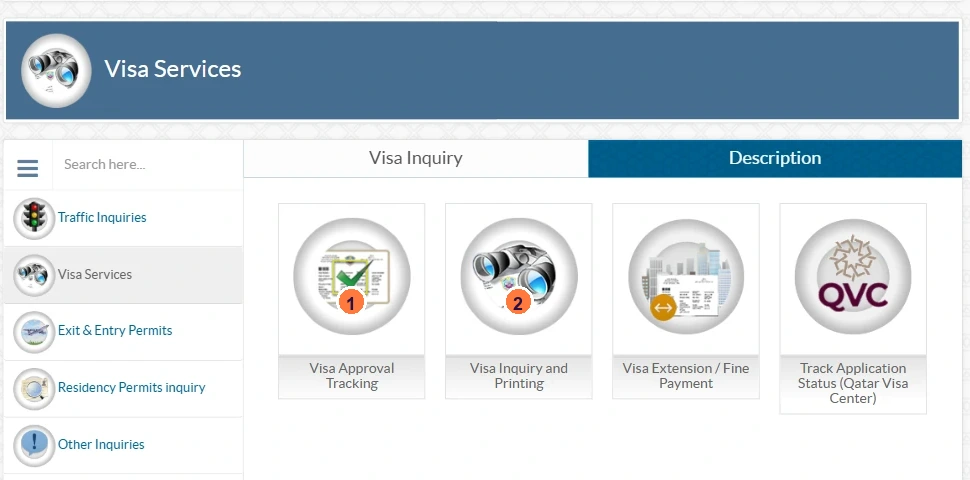
- Visa Approval Tracking (1). Use this when you have an application reference and want the approval stage.
- Visa Inquiry and Printing (2). Use this when you have a visa number or passport number and need the status, payment or print.
- Visa Extension / Fine Payment. Use this for an extension or an overstay fine, not for a first status check.
- Track Application Status (Qatar Visa Center). Use this when the application was filed through QVC.
The next step depends on which number you hold. The tool below keeps the routes separate.
Pick the number you have
The right MOI tile changes with the reference in your hand.
Choose the reference you have.
What the MOI Form Asks For
The public form asks for three details and a verification code. No login is needed.
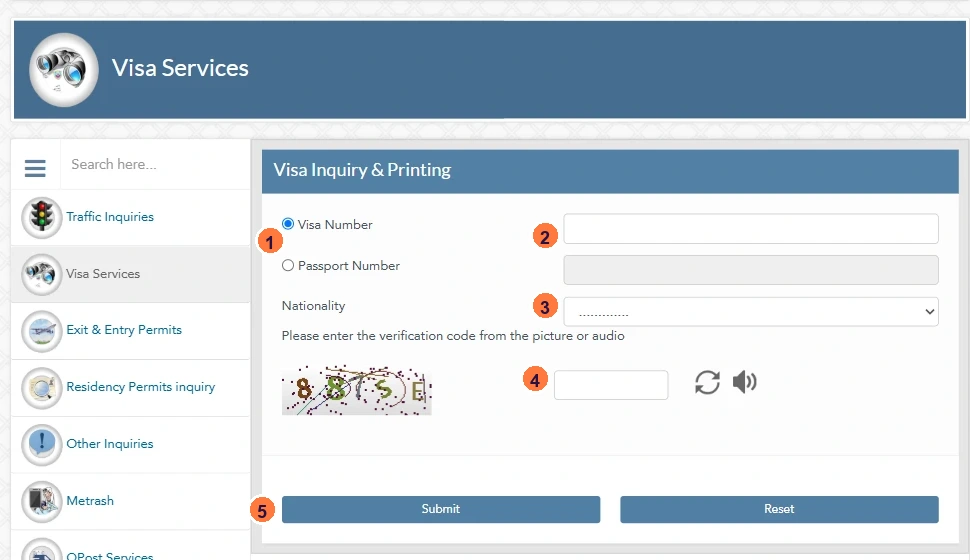
- The visa number or passport number. Use the number on the visa application or the passport used in the application.
- The nationality in the application. Select the same nationality, not the current residence country.
- The verification code. Enter the CAPTCHA code from the picture or use the audio option.
Do not add spaces or hyphens to the passport number unless the form accepts them. Copy the number from the passport data page.
Check Your Qatar Visa Status in Six Steps
Hukoomi lists the official flow in four steps. The MOI form adds the CAPTCHA before Submit.
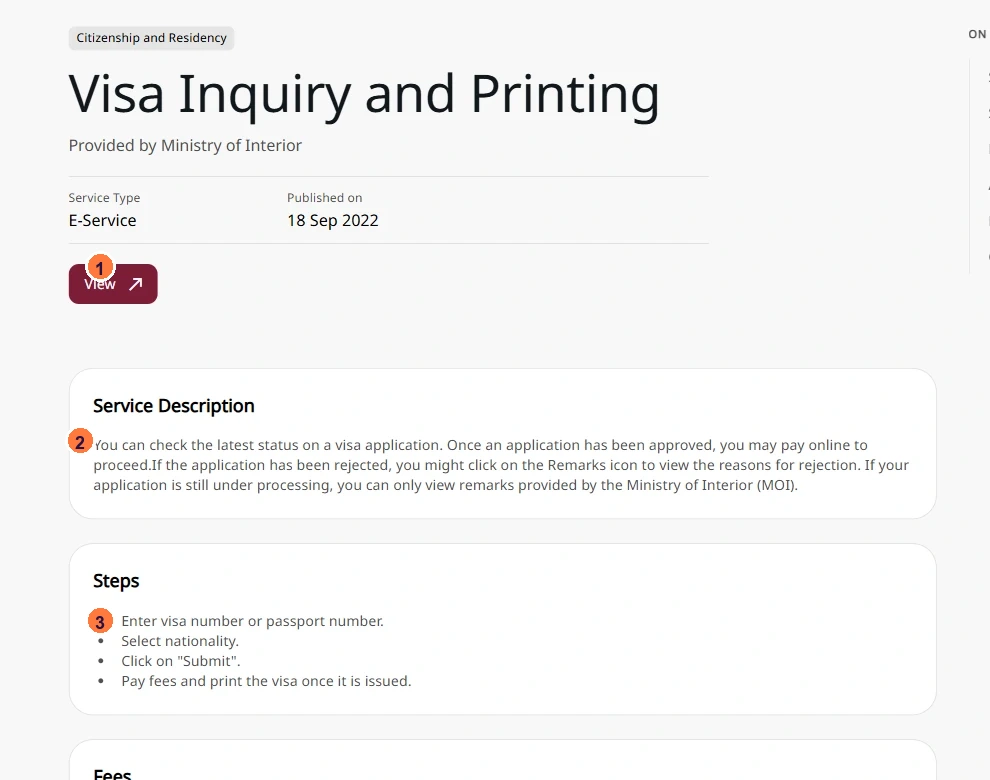
- Open the MOI Visa Inquiry and Printing service.
- Choose Visa Number or Passport Number.
- Enter the number exactly as it is printed in the application.
- Select the nationality used in the application.
- Complete the CAPTCHA from the picture or audio.
- Click Submit and read the status.
After Submit, the page shows the record or a message. A status means use the table below. A no-record message means check the details before trying again.
What Approved, Processing, Rejected and No Record Mean
The portal may use slightly different labels. The action usually falls into one of these groups.
| Status | What it means | What to do |
|---|---|---|
| Approved | The application has cleared the approval stage. | Pay the fee online, then print the visa. |
| Processing | The MOI is still reviewing the application. | Wait. Read any remark the MOI has added. |
| Rejected | The application did not pass. | Open the Remarks icon and read the reason before reapplying. |
| Issued | The visa is ready. | Print it and check the name, passport number, visa number and validity. |
| No record | The form did not find a matching record. | Check the number, nationality and application route, then retry. |
A status is not a guarantee of entry. The visa must still match the passport and the purpose of travel.
Approved: Pay the Fee and Print the Visa
An approval is not the final step. The MOI service lets you pay online and print the visa once it is issued.
- Pay through the official MOI service, not a third-party link.
- Print the visa and check the name, passport number, visa number and validity.
- Keep a digital copy and a printed copy with the travel documents.
Print fees vary by visa type. The service shows the amount before payment; do not budget from a generic fee table.
Rejected: Read the Remarks Before You Reapply
A rejection is not always the end of the application. The Remarks icon can show the reason the MOI recorded.
Read the remark before changing the file. A document mismatch, an incomplete application or an eligibility issue needs a different fix.
Reapply through the same route that handled the application. A QVC application should go back through QVC, not a new MOI application.
No Record: Check the Number, Nationality and Route
A blank result means the form did not match the details. A blank result does not prove the visa was rejected.
- The visa number or passport number has a typo, space or hyphen.
- The nationality is different from the one used in the application.
- An application number was entered in the visa number field.
- The wrong MOI tile was used: approval tracking instead of inquiry and printing.
- The application is still processing and not yet visible.
- The application was filed through QVC and needs the QVC route.
- The number belongs to an older application or a different passport.
Check the details, wait if the application was just submitted, and ask the sponsor for the application reference. Then try the correct MOI tile.
If You Applied Through Qatar Visa Center
Applications filed through the Qatar Visa Center have their own tracking route. The MOI page lists Track Application Status (Qatar Visa Center) for this.
Use the QVC route while the application is with the center. Once it reaches the MOI, the MOI inquiry may show the record.
Do not open a second application because the MOI page shows no record. Confirm the route first.
Do Not Share the Visa or Passport Number
The visa and passport numbers are personal data. Do not post a screenshot of the result with the number visible.
Use the official MOI Qatar or Hukoomi domain. The official check does not need a password, an OTP or a bank card. An agent who asks for one is not using the official route.
A screenshot shared for help should cover the passport number, visa number and any remark that identifies the applicant.
Need an Employee Visa File Checked?
Meem follows employee visa files for companies it has onboarded, alongside the work permit and QID steps.
The work permit page covers the employer file and the QID sequence. A company that is not set up yet should start with company formation in Qatar.
Conclusion: Use the Right Tile, Then Read the Status
The check is simple once the route is clear. Approval tracking is for an application reference. Visa Inquiry and Printing is for a visa or passport number. QVC is for a QVC application.
Enter the exact number, select the application nationality and complete the CAPTCHA. Then act on the status: pay, wait, read the remark or correct the details.
A blank result is a data problem to solve, not a rejection to panic about.
Frequently Asked Questions
The answers below cover the number to use, the status meanings and the no-record case.
How do I check my Qatar visa status?
Use the MOI Visa Inquiry and Printing service. Choose visa number or passport number, select nationality, complete the CAPTCHA and submit.
Can I check with my passport number?
Yes. Choose Passport Number on the MOI form and enter the passport number used in the application.
What details do I need?
The visa number or passport number, the nationality used in the application and the CAPTCHA code.
What does approved mean?
The application has cleared the approval stage. Pay the fee online and print the visa once it is issued.
What does rejected mean?
The application did not pass. Open the Remarks icon and read the reason before reapplying through the same route.
Why does it show no record?
The number, nationality or route may not match. The application may still be processing, or it may be a QVC application. Check the details and the route.
Can I check a QVC application on MOI?
Use the QVC tracking route while the application is with the center. The MOI record may appear after it reaches the MOI.
Is Metrash a faster way?
Metrash is the MOI app. Use the official MOI service that matches your reference; do not use an unofficial shortcut.
How much does printing cost?
Print fees vary by visa type. The official service shows the amount before payment.
Official Sources
Screenshots captured on 21 October 2026. The forms and labels can change; use the official page for the current version.

Jisham
Head of Operations at Meem
4+ years of Qatar PRO experience across ministries and authorities, including establishment licensing and approvals.
Connect On LinkedIn →